This is the second follow-up to Friday’s release post. It covers the platform APIs that moved into the framework core this release. There are two headline pieces (AI / LLM and the modern OAuth / OIDC stack), and two smaller pieces (WiFi / connectivity and share-sheet result callbacks). This continues the direction the previous release set when we moved NFC, biometrics, and cryptography into the framework core. The full background on that earlier set is in NFC, Crypto, Biometrics, And A New Build Cloud.
AI: a first-class LLM client and a ChatView component
PR #5035 lands the com.codename1.ai package, the ChatView UI component, the speech and TTS additions, and the build-time dependency injection that wires the native pieces in. PR #5057 lands the developer-guide chapter and the agent-skill addition so any project generated from the Initializr inherits the new APIs through its bundled AGENTS.md.
LlmClient: the basic chat request
com.codename1.ai.LlmClient is the entry point. The simplest possible use:
LlmClient client = LlmClient.openai(apiKey);

ChatRequest req = new ChatRequest.Builder()
        .model("gpt-4o-mini")
        .system("You are a helpful assistant.")
        .user("What is the capital of France?")
        .temperature(0.7)
        .build();

client.chat(req).onResult((resp, err) -> {
    if (err != null) {
        Log.e(err);
        return;
    }
    Log.p(resp.firstChoice().content());
});
LlmClient.openai(...), LlmClient.anthropic(...), LlmClient.gemini(...), LlmClient.ollama(...), and LlmClient.openAiCompatible(baseUrl, apiKey) are the factories. All five are fully implemented native clients. The OpenAI client also drives Ollama, vLLM, llama.cpp, and any other endpoint that speaks the OpenAI wire format, so most local-model stacks plug in through LlmClient.openAiCompatible(...) without a separate driver.
Streaming chat (what you actually want for chat UIs)
For any UI that types responses out token-by-token, the streaming entry point is the one to reach for. The callback fires on the EDT, so you can append directly to a text component:
client.chatStream(req, new ChatStreamListener() {

    @Override
    public void onDelta(ChatDelta d) {
        responseLabel.setText(responseLabel.getText() + d.contentDelta());
        responseLabel.getParent().revalidateLater();
    }

    @Override
    public void onComplete(ChatResponse fin) {
        sendButton.setEnabled(true);
    }

    @Override
    public void onError(Throwable t) {
        Log.e(t);
        sendButton.setEnabled(true);
    }
});
Under the hood this is a custom ConnectionRequest subclass that parses SSE line-by-line and dispatches each delta through Display.callSerially. AsyncResource.cancel() kills the socket. So a chat UI that has a cancel button is a one-line cancellation.
Tool calls
If you want the model to call back into your app, Tool / ToolChoice give you OpenAI-style function calling. Define the tool, hand the model your model and the available tools, and the response surfaces structured ToolCall objects you dispatch:
Tool getWeather = Tool.builder()
        .name("get_weather")
        .description("Look up the current weather for a city.")
        .parameter("city", "string", "The city name, e.g. \"Paris\".")
        .build();

ChatRequest req = new ChatRequest.Builder()
        .model("gpt-4o-mini")
        .user("Is it raining in Tel Aviv right now?")
        .tool(getWeather)
        .toolChoice(ToolChoice.AUTO)
        .build();

client.chat(req).onResult((resp, err) -> {
    if (err != null) return;
    for (ToolCall call : resp.firstChoice().toolCalls()) {
        if ("get_weather".equals(call.name())) {
            String city = call.argument("city").asString();
            String json = lookupWeather(city);
            // Loop the result back into the conversation
            client.chat(req.replyWithToolResult(call, json))
                  .onResult((followUp, e) -> updateUi(followUp));
        }
    }
});
The shape mirrors the OpenAI function-calling contract one for one, so anything you have written against the OpenAI API directly maps across without rethinking.
Embeddings
LlmClient.embed(...) returns a vector for any input string. Useful for similarity search against a local SQLite store (Wednesday’s post will cover the new ORM that pairs with this):
EmbeddingRequest er = new EmbeddingRequest.Builder()
        .model("text-embedding-3-small")
        .input("Codename One is a cross-platform mobile framework.")
        .build();

client.embed(er).onResult((emb, err) -> {
    float[] vector = emb.firstVector();
    // store, search, compare
});
Image generation
DALL-E and a Replicate scaffold are surfaced through ImageGenerator:
ImageGenerator gen = ImageGenerator.openAiDallE(apiKey);

gen.generate("A red bicycle leaning against an olive tree", "1024x1024")
   .onResult((img, err) -> {
       if (err != null) return;
       myImageComponent.setIcon(img);
   });
Working against Ollama in the simulator (no API charges)
JavaSEPort pings localhost:11434 at startup. If it finds Ollama, it sets the cn1.ai.ollamaDetected property. With cn1.ai.simulatorRedirect=auto (or =ollama) every LlmClient.openai(...) call routes through the local Ollama endpoint instead of OpenAI’s. Production code does not change. The iteration loop, your tests, and your offline debugging stop costing money and stop needing an internet connection.
In common/codenameone_settings.properties:
simulator.cn1.ai.simulatorRedirect=auto
(The simulator. prefix scopes the property to the JavaSE simulator path.) Then run Ollama locally with whichever model your code expects (ollama run llama3.2 or similar) and your existing LlmClient.openai(...) calls go to localhost.
How to handle API keys
A direct word on credentials before any of the above sees production. LLM provider API keys (OpenAI, Anthropic, Gemini, your Auth0 / Firebase configs) are bearer tokens with a budget attached. They must never be checked into source control, embedded in your app binary, or hard-coded in code. A leaked key can be extracted from any APK or IPA in minutes and used to drain your account.
The correct shape is to fetch the key from your own backend over an authenticated request, then store it on the device using the platform’s keychain / keystore. The framework provides both pieces:
com.codename1.crypto.SecureStorage(from the previous release) is the cross-platform wrapper over iOS Keychain Services and AndroidEncryptedSharedPreferences. Values are encrypted at rest using the platform’s hardware-backed protection class where one is available.- This release adds single-argument
get / set / remove(account, ...)overloads next to the existing biometric-gated methods. The new overloads store the value without a per-read Face ID / Touch ID prompt, which is what you want for an LLM API key (you read it on every network call; a biometric prompt every time is not workable). The biometric-gated methods are still there for credentials you do want to gate per use.
A reasonable shape:
private static AsyncResource<String> getOpenAiKey() {
    String cached = SecureStorage.get("openai_api_key");
    if (cached != null) {
        return AsyncResource.complete(cached);
    }
    return Rest.get(myServer + "/v1/credentials/openai")
               .bearerToken(userSessionToken())
               .fetchAsString()
               .onResult((key, err) -> {
                   if (err == null) {
                       SecureStorage.set("openai_api_key", key);
                   }
               });
}
Your server gates the credential request behind the user’s session, your app caches the result on the keychain, and the key never sits anywhere a reverse-engineering pass could find it. If your server rotates the key, invalidate the cache and refetch.
Existing biometric-gated SecureStorage calls keep working unchanged. The new overloads are additive.
ChatView: a ready-made streaming chat UI
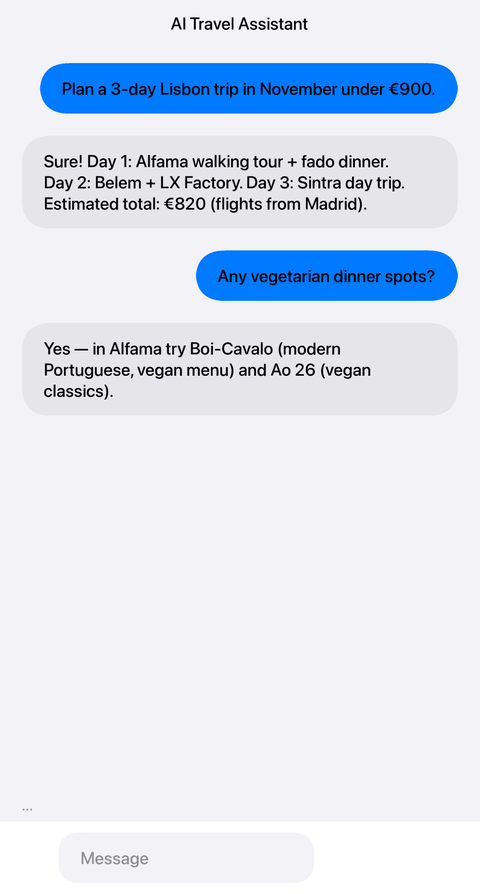
com.codename1.components.ChatView is the matching UI component. Scrollable message list, ChatBubble for the per-message bubble (theme-aware UIIDs so it picks up the iOS Modern / Material 3 native themes consistently), ChatInput for the bottom input bar, and a one-line bindToLlm(...) that wires the input to a streaming chat request:
ChatView view = new ChatView();
getOpenAiKey().onResult((key, err) -> {
    view.bindToLlm(LlmClient.openai(key),
                   new ChatRequest.Builder()
                           .model("gpt-4o-mini")
                           .system("You are a friendly tutor for "
                                   + "Codename One developers.")
                           .build());
});

Form f = new Form("Chat", new BorderLayout());
f.add(BorderLayout.CENTER, view);
f.show();
The result is a standard mobile chat layout, picked up from whichever native theme the project uses:
If you want more control than bindToLlm(...) gives you (custom message styling, a “thinking” placeholder, hand-rolled retry, persistence to your own model class), drive the view by hand:
ChatView view = new ChatView();
ConversationStore store = ConversationStore.open("tutor-thread");
view.setMessages(store.load());

LlmClient client = LlmClient.openai(apiKeyFromKeychain);

view.setInputListener(userText -> {
    ChatMessage userMsg = ChatMessage.user(userText);
    view.appendMessage(userMsg);
    store.append(userMsg);

    ChatMessage assistant = ChatMessage.assistant("");
    view.appendMessage(assistant);

    ChatRequest req = new ChatRequest.Builder()
            .model("gpt-4o-mini")
            .messages(store.load())
            .build();

    client.chatStream(req, new ChatStreamListener() {
        @Override
        public void onDelta(ChatDelta d) {
            view.appendToLastMessage(d.contentDelta());
        }
        @Override
        public void onComplete(ChatResponse fin) {
            store.append(ChatMessage.assistant(view.lastMessage().content()));
            view.setInputEnabled(true);
        }
        @Override
        public void onError(Throwable t) {
            view.appendToLastMessage(" [error: " + t.getMessage() + "]");
            view.setInputEnabled(true);
        }
    });
});
appendToLastMessage(...) is the streaming entry point; it marshals through callSerially so deltas land on the EDT in order. ConversationStore persists the thread (the default backing is Storage; pluggable via a custom implementation if you would rather keep it in SQLite or push it to your server).
The AI cn1libs
The core LLM stack is paired with a set of opt-in cn1libs that wrap specific on-device capabilities: Google ML Kit features, the TensorFlow Lite runtime, a local Whisper transcription engine, and an on-device Stable Diffusion model. Thirteen new cn1libs ship this release.
These cn1libs are not yet listed in the Codename One Preferences cn1lib picker, so for the moment they are added by hand. Drop the matching dependency block into your project’s common/pom.xml and rebuild. The build-time scanner does the rest: the iOS pod or Swift Package, the Android Gradle dependency, the plist usage strings (NSCameraUsageDescription for the vision libraries, NSSpeechRecognitionUsageDescription for Whisper, etc.), and the Android permissions (android.permission.RECORD_AUDIO for audio capture) are all injected automatically the first time the scanner sees the matching class on the classpath.
For each cn1lib below, the dependency block is identical in shape; only the <artifactId> changes. The shared pattern is:
<dependency>
    <groupId>com.codenameone</groupId>
    <artifactId><!-- cn1lib artifact id from below --></artifactId>
    <version>${cn1.version}</version>
</dependency>
cn1-ai-mlkit-text: text recognition (OCR)
TL;DR. Pull printed or handwritten text out of an image (a photo of a page, a sign, a receipt) entirely on-device.
Platforms. iOS bridges to GoogleMLKit/TextRecognition. Android bridges to com.google.mlkit:text-recognition. The JavaSE simulator returns an unsupported error.
Use cases. Receipt scanning, sign translation pipelines (combine with cn1-ai-mlkit-translate), accessibility tools that read printed text aloud, automated form ingestion.
byte[] jpeg = capturePhotoBytes();
TextRecognizer.recognize(jpeg).onResult((text, err) -> {
    if (err == null) Log.p("OCR: " + text);
});
cn1-ai-mlkit-barcode: barcode and QR scanning
TL;DR. Decodes QR, EAN, UPC, Data Matrix, PDF417, and the rest of the common 1D / 2D code families from a captured image.
Platforms. iOS bridges to MLKitBarcodeScanning. Android bridges to com.google.mlkit:barcode-scanning. The JavaSE simulator returns an unsupported error.
Use cases. Inventory scanning, ticket / boarding-pass readers, QR-driven onboarding flows, retail loyalty cards.
byte[] jpeg = capturePhotoBytes();
BarcodeScanner.scan(jpeg).onResult((codes, err) -> {
    if (err == null) {
        for (String code : codes) Log.p("Found: " + code);
    }
});
cn1-ai-mlkit-face: face detection
TL;DR. Returns bounding boxes for human faces detected in an image. Each face is reported as a packed int[4] (x, y, width, height).
Platforms. iOS bridges to MLKitFaceDetection. Android bridges to com.google.mlkit:face-detection.
Use cases. Auto-crop a contact photo, mosaic / blur bystanders in a group shot, drive a face-tracked overlay for AR-lite filters.
FaceDetector.detect(jpeg).onResult((boxes, err) -> {
    if (err != null) return;
    for (int i = 0; i < boxes.length; i += 4) {
        Log.p("face at " + boxes[i] + "," + boxes[i + 1] + " "
                + boxes[i + 2] + "x" + boxes[i + 3]);
    }
});
cn1-ai-mlkit-labeling: image labelling
TL;DR. “What is in this picture.” Returns a list of descriptive labels for the image content.
Platforms. iOS bridges to MLKitImageLabeling. Android bridges to com.google.mlkit:image-labeling.
Use cases. Auto-tagging uploaded photos, content moderation pre-filters, content-based image search.
ImageLabeler.label(jpeg).onResult((labels, err) -> {
    if (err == null) Log.p("labels: " + String.join(", ", labels));
});
cn1-ai-mlkit-translate: on-device translation
TL;DR. Translate short text between supported language pairs entirely on-device; no server round-trip, no API key, works offline.
Platforms. iOS bridges to MLKitTranslate. Android bridges to com.google.mlkit:translate. Languages are identified by their ISO 639-1 codes (en, fr, es, …).
Use cases. Offline travel assistants, chat translation, accessibility readers for foreign signage (combine with cn1-ai-mlkit-text).
Translator.translate("Where is the train station?", "en", "fr")
    .onResult((fr, err) -> {
        if (err == null) Log.p(fr);   // "Où est la gare ?"
    });
cn1-ai-mlkit-smartreply: short reply suggestions
TL;DR. Generates short suggested replies for chat conversations, similar to Gmail’s Smart Reply chips.
Platforms. iOS bridges to MLKitSmartReply. Android bridges to com.google.mlkit:smart-reply. The input is a JSON array of {role, message, timestamp, userId} objects.
Use cases. A “quick reply” row above the keyboard in your in-app chat, response suggestions in a CRM inbox.
String thread = "[{\"role\":\"remote\",\"message\":\"See you at 6?\","
              + "\"timestamp\":" + System.currentTimeMillis() + ","
              + "\"userId\":\"u42\"}]";

SmartReply.suggest(thread).onResult((suggestions, err) -> {
    if (err == null) {
        for (String s : suggestions) Log.p("suggestion: " + s);
    }
});
cn1-ai-mlkit-langid: language identification
TL;DR. Returns the most likely ISO 639-1 code for a given text, or und (undetermined) when the input is too short or ambiguous.
Platforms. iOS bridges to MLKitLanguageID. Android bridges to com.google.mlkit:language-id.
Use cases. Auto-route a customer-support message to the right team, pick the correct TTS voice for an arbitrary string, pre-screen input before running an expensive translate.
LanguageIdentifier.identify("Bonjour le monde").onResult((code, err) -> {
    if (err == null) Log.p(code);   // "fr"
});
cn1-ai-mlkit-pose: pose detection
TL;DR. Returns 33 skeletal landmarks per detected pose as a packed float[3 * 33] (x, y, confidence triples).
Platforms. iOS bridges to MLKitPoseDetection. Android bridges to com.google.mlkit:pose-detection.
Use cases. Fitness apps with form correction, dance / yoga timing analysis, gesture-driven controls.
PoseDetector.detect(jpeg).onResult((landmarks, err) -> {
    if (err != null || landmarks.length < 99) return;
    float noseX = landmarks[0], noseY = landmarks[1], noseConf = landmarks[2];
    Log.p("nose at (" + noseX + ", " + noseY + ") conf=" + noseConf);
});
cn1-ai-mlkit-segmentation: selfie segmentation
TL;DR. Returns a per-pixel mask separating the person in the foreground from the background as byte[width * height] (0 = background, 255 = foreground).
Platforms. iOS bridges to MLKitSegmentationSelfie. Android bridges to com.google.mlkit:segmentation-selfie.
Use cases. Background replacement for video calls, sticker / portrait-mode effects, blur-the-background privacy filters.
SelfieSegmenter.segment(jpeg).onResult((mask, err) -> {
    if (err == null) applyBackgroundReplacement(mask);
});
cn1-ai-mlkit-docscan: document scanner
TL;DR. Detects a rectangular document in a photo, perspective-corrects it, and writes the cropped JPEG to a temporary file. Returns the file path.
Platforms. iOS uses Apple’s VisionKit + Core Image rectangle detection (no extra pod). Android uses com.google.android.gms:play-services-mlkit-document-scanner.
Use cases. “Scan to PDF” flows, expense apps that capture receipts, contract signing flows, ID-document capture.
DocumentScanner.scanToFile(jpeg).onResult((path, err) -> {
    if (err == null) uploadDocument(path);
});
cn1-ai-tflite: TensorFlow Lite interpreter
TL;DR. A general-purpose on-device inference engine. Bring your own .tflite model and run it against a float32 input tensor.
Platforms. iOS uses TensorFlowLiteSwift (Pods or Swift Package). Android uses org.tensorflow:tensorflow-lite + tensorflow-lite-support.
Use cases. Any custom on-device ML model your team trains or pulls from TF Hub. Image classification, simple regression, recommendation pre-filters.
byte[] modelBytes = Util.readFully(Display.getInstance().getResourceAsStream(null, "/model.tflite"));
float[] input = featureVector();
Interpreter.run(modelBytes, input).onResult((output, err) -> {
    if (err == null) Log.p("model returned " + output.length + " values");
});
cn1-ai-whisper: speech-to-text via whisper.cpp
TL;DR. On-device transcription of a 16 kHz mono WAV file using a ggml-format Whisper model. The cn1lib bundles libwhisper.a.
Platforms. iOS uses the Accelerate framework; Android uses a JNI build of the same whisper.cpp core. Models (e.g. ggml-base.bin) are not bundled; ship the one your app expects under the app’s resources or download on first launch.
Use cases. Voice notes, accessibility transcription, offline dictation, podcast indexing.
String modelPath = SecureStorage.getFilePath("ggml-base.bin");
String audioPath = recordWavToFile();
WhisperRecognizer.transcribe(modelPath, audioPath)
    .onResult((text, err) -> {
        if (err == null) Log.p("heard: " + text);
    });
cn1-ai-stablediffusion: on-device image generation
TL;DR. Generates a JPEG from a text prompt using a bundled Stable Diffusion model. Multi-gigabyte payload, local build only.
Platforms. iOS uses Core ML pipelines compiled from the bundled model. Android uses ONNX Runtime. Both configurations exceed the cloud build server’s 2 GB upload limit, so this cn1lib triggers the cn1.ai.requiresBigUpload guard and the cloud build aborts with a “build this one locally” message. Add it to a project you build via mvn cn1:buildAndroid / mvn cn1:buildIosXcodeProject on the developer machine.
Use cases. Avatar generation in apps where shipping to a cloud API is undesirable (offline-first apps, regulated industries, privacy-sensitive products).
StableDiffusion.generate("a teal hot-air balloon over Lisbon, watercolour",
                         512, 512, /* steps */ 25)
    .onResult((jpeg, err) -> {
        if (err == null) display(Image.createImage(jpeg, 0, jpeg.length));
    });
Why these are cn1libs and not part of the core
The core gets the AI plumbing every app that adopts AI at all wants: the LLM client, streaming, the chat UI, the secure storage primitive for credentials, the simulator Ollama redirect for offline iteration.
The cn1libs above are specialised verticals. Barcode scanning, document scanning, face detection, smart reply, pose detection, on-device translation, transcription, on-device image generation, each is genuinely useful, but only for some apps. They also each bring a non-trivial native dependency. The Google ML Kit Android frameworks are large; the iOS pods carry their own weight; the bundled libwhisper.a and the Stable Diffusion model are big. Pulling all of them into core would tax every app whether the feature is used or not.
The Stable Diffusion cn1lib in particular is large enough that the cloud build server cannot accept the upload at all (it trips the 2 GB pre-upload guard). That kind of opt-in does not belong in a dependency every app inherits.
The corresponding chapter, including the full LlmClient API table, the ChatView reference, the SecureStorage overloads, the simulator Ollama redirect, and the full cn1lib coverage, is at AI, Chat UI, and Speech in the developer guide.
OAuth and OIDC: the modern identity stack
The in-app-WebView Oauth2 flow that Codename One has shipped since approximately forever was the way every cross-platform mobile framework solved “sign in with Google / Facebook / Microsoft” in the 2010s. It is also the way every one of those identity providers stopped wanting you to solve it. Google has been blocking embedded user agents for years. Apple does not want third-party apps wrapping the Apple ID flow in a WKWebView. Microsoft and Facebook joined the chorus. The right answer is the system browser: ASWebAuthenticationSession on iOS, Custom Tabs on Android, with PKCE on the wire. That is what PR #5018 lands. PR #5039 adds a portable WebAuthn / passkey client on top.
Sign in with Google (or any OIDC provider)
com.codename1.io.oidc.OidcClient is the entry point. Point it at the discovery URL of an OIDC provider, hand it the client id and the redirect URI you registered with the provider, ask for tokens:
OidcConfiguration cfg = OidcConfiguration.discover("https://accounts.google.com");

OidcClient client = OidcClient.builder()
        .configuration(cfg)
        .clientId("123-abc.apps.googleusercontent.com")
        .redirectUri("com.example.myapp:/oauthredirect")
        .scopes("openid", "email", "profile")
        .build();

client.signIn().onResult((tokens, err) -> {
    if (err != null) {
        OidcException oe = (OidcException) err;
        if (oe.getCode() == OidcException.USER_CANCELLED) return;
        Log.e(oe);
        return;
    }
    String idToken = tokens.getIdToken().raw();
    String email   = tokens.getIdToken().getClaim("email").asString();
    proceed(email, idToken);
});
Discovery JSON parsed and cached. PKCE S256 challenge generated and verified. State and nonce checked on the callback. ID-token claims decoded for you (we deliberately do not verify the signature client-side; the dev guide is explicit about why and points at the “re-validate on your backend” remedy). Refresh and revoke are first-class. The token store is pluggable via TokenStore; the default is Storage-backed, but a Keychain-backed or in-memory variant is a small class.
On iOS the system-browser piece routes through ASWebAuthenticationSession. On Android through androidx.browser.customtabs with a plain ACTION_VIEW fallback for the rare device with no Custom Tabs provider. AuthenticationServices.framework and androidx.browser:browser are auto-linked when the classpath scanner sees OidcClient in use.
Provider wrappers: Google, Apple, Microsoft, Facebook, Auth0, Firebase
If you would rather not configure OIDC by hand, the existing social classes get a signIn(...) method that drives the same stack with the provider’s issuer URL pre-wired:
GoogleConnect.signIn(googleClientId,
                     "com.example.myapp:/oauthredirect",
                     "openid", "email", "profile")
    .onResult((tokens, err) -> { /* ... */ });

MicrosoftConnect.signIn(entraClientId,
                        "msauth.com.example.myapp://auth",
                        "User.Read")
    .onResult((tokens, err) -> { /* ... */ });

Auth0Connect.signIn("tenant.auth0.com", clientId, redirectUri,
                    "openid profile email")
    .onResult((tokens, err) -> { /* ... */ });
FacebookConnect.signIn(...) follows the same shape against the Facebook OIDC endpoint. FirebaseAuth covers the REST-based Firebase auth surface (email / password, IdP token exchange, refresh) which sits underneath any provider hand-off you might want to drive from app code.
Sign in with Apple
Sign in with Apple is required on iOS for apps that offer any other social login, and on Android it must fall through to a web flow. com.codename1.social.AppleSignIn handles both transparently:
AppleSignIn.signIn()
    .onResult((result, err) -> {
        if (err != null) return;
        String idToken = result.getIdToken();
        String code    = result.getAuthorizationCode();
        proceedToBackend(idToken, code);
    });
On iOS 13 and later this drops directly into the native Apple sheet via ASAuthorizationAppleIDProvider. On non-iOS platforms it falls through to the same OIDC web flow as everything else, so a single line of app code does the right thing on every port. The Maven plugin injects the com.apple.developer.applesignin entitlement on iOS when it sees AppleSignIn in use; Android does not see it because it is not there.
Migration from the legacy Oauth2
com.codename1.io.Oauth2 is now deprecated. Existing code still compiles, but the migration is short and almost always shorter than what it replaces:
// Before
Oauth2 oauth = new Oauth2("https://accounts.google.com/o/oauth2/auth", clientId, redirectUri);
oauth.setClientSecret(clientSecret);
oauth.setScope("openid email profile");
oauth.setBrowserComponent(myBrowserComponent);   // tied to a WKWebView
String token = oauth.authenticate();             // blocks, opens the web view
// After
OidcClient.builder()
        .configuration(OidcConfiguration.discover("https://accounts.google.com"))
        .clientId(clientId)
        .redirectUri(redirectUri)
        .scopes("openid", "email", "profile")
        .build()
        .signIn()
        .onResult((tokens, err) -> proceed(tokens.getIdToken().raw()));
You stop owning the browser. The OS owns it. The cookies live in the platform’s authentication session. The user gets the same login experience they have everywhere else on their device.
WebAuthn / passkeys
PR #5039 layers a portable WebAuthn client on top:
WebAuthnClient client = WebAuthnClient.getInstance();
if (!client.isAvailable()) { fallbackToPassword(); return; }

PublicKeyCredentialCreationOptions opts =
        PublicKeyCredentialCreationOptions.fromServerJson(serverJson);
client.create(opts).onResult((cred, err) -> {
    if (err == null) postToRelyingParty(cred.toJson());
});
W3C JSON wire format in both directions, so the response can be POSTed verbatim to any standard server-side WebAuthn library. iOS 16+ routes through ASAuthorizationPlatformPublicKeyCredentialProvider; Android API 28+ through androidx.credentials.CredentialManager. Provider helpers: Auth0Connect.signInWithPasskey(...) / .registerPasskey(...) and FirebaseAuth.signInWithPasskey(...) / .registerPasskey(...).
One thing worth pulling out before you reach for it: if you sign in via OIDC against Google, Apple, Microsoft, Auth0, or Firebase, you usually already get passkeys for free. The identity provider runs the WebAuthn ceremony inside the system browser; OIDC just hands you the resulting tokens. So you do not need WebAuthnClient for that case. You need it for apps that run their own relying-party backend, and for apps driving the Auth0 or Firebase passkey grants directly.
Full chapter: Authentication and Identity.
Connectivity: WiFi, Bonjour, USB, network-type listeners
PR #5021 lands four packages for apps that need to do more with the network than open an HTTP socket. The shape:
WiFi wifi = WiFi.getInstance();
String ssid    = wifi.getCurrentSSID();
String bssid   = wifi.getBSSID();
String gateway = wifi.getGateway();
String ip      = wifi.getIp();

wifi.scan(new ScanOptions().setTimeoutMillis(5000))
   .onResult((results, err) -> { /* ... */ });

wifi.connect("MyNetwork", "hunter2", Security.WPA2_PSK)
   .onResult((success, err) -> { /* ... */ });
com.codename1.io.wifi for WiFi info, scan, and connect. com.codename1.io.wifi.WiFiDirect for peer-to-peer (Android only by platform reality). com.codename1.io.bonjour for mDNS / Zeroconf via BonjourBrowser and BonjourPublisher. com.codename1.io.usb for USB host (Android only). And NetworkManager.addNetworkTypeListener(...) plus NETWORK_TYPE_* constants so an app can react to a transition between cellular, WiFi, ethernet, or “none”:
NetworkManager.getInstance().addNetworkTypeListener(evt -> {
    int type = evt.getNetworkType();
    if (type == NetworkManager.NETWORK_TYPE_NONE)     showOfflineBanner();
    else if (type == NetworkManager.NETWORK_TYPE_CELLULAR) suppressLargeBackgroundDownloads();
    else                                              clearOfflineBanner();
});
iOS does not expose programmatic WiFi scanning to third-party apps; scan() throws UnsupportedOperationException on iOS. iOS also does not expose WiFi Direct or general USB host. None of those are Codename One limitations; they are Apple’s. The dev guide is explicit about each platform’s limits.
Three new compile-time defines (CN1_INCLUDE_WIFI_INFO, CN1_INCLUDE_HOTSPOT, CN1_INCLUDE_BONJOUR) wrap the iOS native code, set only when the classpath scanner sees the matching Java API in use. Apps that do not use these APIs do not pay for them at App Store review time. Same pattern as the NFC gating from the previous release.
Full reference: Network Connectivity.
Share-sheet result callbacks
PR #5036 closes a small but persistent gap: Display.share(...) and ShareButton finally tell you what the user did with the share sheet:
ShareButton btn = new ShareButton();
btn.setTextToShare("Look at this fox");
btn.setImageToShare("/fox.jpg");
btn.setShareResultListener(result -> {
    switch (result.getStatus()) {
        case SHARED_TO: track("share_completed", result.getTargetPackage()); break;
        case DISMISSED: track("share_dismissed"); break;
        case FAILED:    track("share_failed", result.getError()); break;
    }
});
iOS routes through UIActivityViewController.completionWithItemsHandler; Android through Intent.createChooser with an IntentSender callback (API 22+). The framework normalises the platform values into SHARED_TO(packageName), DISMISSED, or FAILED.
Appearing in other apps’ share menus
The other half of sharing is the inverse direction: not “let the user share from your app”, but “let your app receive content other apps share”. If a user is in Safari, Photos, or Mail and taps the share icon, your app should be able to appear as a target there alongside Messages, WhatsApp, and Instagram. On iOS that requires a separate Share Extension target inside the .ipa, with its own bundle, its own Info.plist, an App Group string that links it to the host app, and a ShareViewController that handles the incoming payload. Historically the recommendation was to bootstrap that target by hand in Xcode, copy the resulting files into the Codename One project under ios/app_extensions/, and let the build server’s extractor consume them. It worked, but it was a workflow most teams put off because the setup is fiddly.
The same PR ships an IOSShareExtensionBuilder Mojo that does all of that for you. A typical setup is one Maven command and a one-time configuration block:
<plugin>
  <groupId>com.codenameone</groupId>
  <artifactId>codenameone-maven-plugin</artifactId>
  <configuration>
    <iosShareExtension>
      <bundleIdentifier>com.example.myapp.share</bundleIdentifier>
      <displayName>MyApp</displayName>
      <appGroup>group.com.example.myapp</appGroup>
      <acceptedContent>
        <content>PUBLIC_URL</content>
        <content>PUBLIC_IMAGE</content>
        <content>PUBLIC_TEXT</content>
      </acceptedContent>
    </iosShareExtension>
  </configuration>
</plugin>
Run mvn cn1:generate-ios-share-extension and the Mojo writes a complete .ios.appext bundle into ios/app_extensions/: the Info.plist with the right NSExtension activation rules for the content types you declared, the App Group entitlement, a minimal ShareViewController.swift that lands the payload in the App Group’s UserDefaults(suiteName:), and the matching buildSettings.properties. The result feeds straight into the existing IPhoneBuilder.extractAppExtensions pipeline, so apps that already have a hand-rolled extension keep working unchanged.
On the host-app side you read the payload on launch:
// Anywhere after Display.init has run
String shared = Storage.getInstance()
        .readObject("ios.shareExtension.lastPayload");
if (shared != null) {
    handleSharedPayload(shared);
}
After the next cloud or local build, your app appears in the iOS share sheet for the content types you declared. No Xcode work, no hand-rolled plist, no App Group string typed in three places. The build-time tooling owns it.
Wrapping up
Wednesday’s post covers the architectural change in this release: a build-time bytecode annotation framework, the declarative router that is its first consumer, the SQLite ORM and JSON / XML mappers and component binder built on the same SPI, and the build-time SVG / Lottie transcoder that ships in the same release for related reasons.
Back to the weekly index.
Discussion
Join the conversation via GitHub Discussions.