
This is the third follow-up to Friday’s release post. Saturday’s was about how you iterate; Monday’s was about new platform APIs in the core; today’s is about a run of pieces that change how you write the structural parts of an app.
The pieces are an OpenAPI client generator, a SQLite ORM, JSON and XML mappers, a component binder with validation, build-time SVG and Lottie transcoders, and a declarative router with deep links. All ride on a single build-time codegen pipeline: a Maven-plugin pass that reads annotations or declarative source files at build time and emits typed Java that compiles into your binary. No reflection, no service loader, no Class.forName. The “How it works” section at the end of this post covers the codegen plumbing once you have seen what it powers.
OpenAPI client generation
The headline of this release for any team that talks to a backend.
A new cn1:generate-openapi-client Mojo reads an OpenAPI 3.x JSON spec (a URL or a local file) and writes typed Codename One client code that compiles into your app:
- One
@MappedPOJO percomponents.schemasentry. - One
<Tag>Api.javaclass per OpenAPI tag, with one fluent method per operation. - Every method routes through
Rest.<verb>+Mappers.toJson+fetchAsMapped/fetchAsMappedList, so the generated surface integrates with the rest of the framework instead of dragging in a separate HTTP stack.
Wire it into the project’s pom.xml:
<plugin>
    <groupId>com.codenameone</groupId>
    <artifactId>codenameone-maven-plugin</artifactId>
    <executions>
        <execution>
            <id>petstore-client</id>
            <goals><goal>generate-openapi-client</goal></goals>
            <configuration>
                <specUrl>https://petstore3.swagger.io/api/v3/openapi.json</specUrl>
                <basePackage>com.example.petstore</basePackage>
            </configuration>
        </execution>
    </executions>
</plugin>
mvn generate-sources picks the spec up, downloads it, and writes one file per schema and one per tag under target/generated-sources/. The Petstore reference spec exercised end-to-end produces six model classes (Pet, Order, Customer, Tag, Category, User) and three Api classes (PetApi, StoreApi, UserApi), and the nine generated .class files compile cleanly against codenameone-core. Documented at the OpenAPI codegen Maven goal.
In application code you call the generated Api class the same way you would call any other Java method:
PetApi pets = new PetApi();

// Returns AsyncResource<Pet>; resolves with the deserialised object.
pets.getPetById(42).onResult((pet, err) -> {
    if (err == null) Log.p("Got " + pet.getName());
});

// Returns AsyncResource<List<Pet>>.
pets.findPetsByStatus("available").onResult((list, err) -> {
    if (err == null) {
        for (Pet p : list) Log.p(p.getName());
    }
});

// POST with a request body. addPet takes a Pet, returns a Pet.
Pet candidate = new Pet();
candidate.setName("Mittens");
candidate.setStatus("available");
pets.addPet(candidate).onResult((created, err) -> { /* ... */ });
There is no hand-rolled ConnectionRequest setup, no manual JSON parsing, no string-typed request bodies. The generated client takes a typed Pet, serialises it with Mappers.toJson(...), fires the right HTTP verb, deserialises the response with Mappers.fromJson(...), and surfaces the result through the framework’s AsyncResource so your callback fires on the EDT.
For teams who already publish an OpenAPI spec as part of their backend (most modern backend frameworks do this automatically; FastAPI, Spring’s springdoc-openapi, NestJS, ASP.NET Core, Go’s gnostic), the practical effect is that the mobile client’s bindings stay in sync with the backend without anyone hand-writing a single network call. Update the spec, re-run mvn generate-sources, and the new and changed endpoints land in your app as typed Java the IDE picks up immediately.
It is the kind of change that is most useful when you do not know you have it: pull a fresh spec, rebuild, and your IDE highlights every place in the codebase that called a renamed endpoint or passed the wrong type to a parameter.
SQLite ORM
@Entity marks the class; @Id and @Column shape the schema; @DbTransient opts a field out:
@Entity
public class TodoItem {
    @Id @Column                  long id;
    @Column                      String title;
    @Column(name = "completed_at")
                                 Date completedAt;
    @DbTransient                 Object cachedView;
}

Dao<TodoItem> dao = EntityManager.open("todos.db").dao(TodoItem.class);
dao.createTable();
dao.insert(new TodoItem(0, "Read the post", null));

List<TodoItem> open = dao.find("completed_at IS NULL", new Object[] {});
TodoItem byId = dao.findById(42);
dao.delete(byId);
The generated DAO does the typed work underneath. No reflection in insert; the generated code calls setString(1, e.title) and setLong(2, e.id) directly against the SQLite PreparedStatement. Validation at build time catches missing @Id, fields that look like relationships but are not yet supported, and abstract entity classes; the build fails with a class name and a reason.
For JPA / Hibernate developers, the API is intentionally familiar. @Entity, @Id, @Column, and @Transient (here renamed @DbTransient to avoid colliding with java.beans.Transient) carry the same meaning they do under javax.persistence / jakarta.persistence. The EntityManager name is the same. Dao#findById, Dao#findAll, Dao#find(where, params), Dao#insert, Dao#update, Dao#delete line up with the basic JPA repository contract. The query language is plain SQL (there is no JPQL or Criteria DSL) but the annotation surface, the lifecycle, and the runtime methods will feel like a long-lost friend to anyone with server-side Java persistence experience.
JSON / XML mapping
@Mapped marks a class as a transferable POJO. @JsonProperty and @XmlElement (plus @XmlRoot, @XmlAttribute, @JsonIgnore, @XmlTransient) shape the wire format. The runtime entry points are Mappers.toJson(...), Mappers.fromJson(...), Mappers.toXml(...), Mappers.fromXml(...):
@Mapped
public class User {
    @JsonProperty("user_id") long   id;
    @JsonProperty            String name;
    @JsonProperty("created_at")
                             Date   createdAt;
    @JsonIgnore              String passwordHash;
}

String json = Mappers.toJson(user);
User   back = Mappers.fromJson(json, User.class);
The same @Mapped POJO is the type the typed Rest helpers accept:
Rest.get("https://api.example.com/users/42")
    .fetchAsMapped(User.class)
    .onResult((user, err) -> { /* ... */ });

Rest.get("https://api.example.com/users")
    .fetchAsMappedList(User.class)
    .onResult((users, err) -> { /* ... */ });
Rest.fetchAsJsonList (top-level JSON arrays, no {"root":[...]} envelope trick), JSONWriter (the complement of JSONParser, with fluent builders and streaming variants for Writer and OutputStream), and URLImage.setDefaultBearerToken (auth headers on image fetches) all ship alongside.
For JAXB developers, the XML surface (@XmlRoot, @XmlElement, @XmlAttribute, @XmlTransient) is a direct port of the long-established javax.xml.bind.annotation surface. The same model class can be both @XmlRoot-decorated and @JsonProperty-decorated, which gives you a single source of truth for both wire formats. The JSON surface adopts the Jackson convention (@JsonProperty, @JsonIgnore) that nearly every modern JVM JSON binding (Jackson, Moshi, kotlinx-serialization) inherited.
Component binding with validation
The fourth annotation processor on the same pipeline is the component binder. @Bindable marks a model class; @Bind(name = "userField") ties a field to a component on a form by the component’s name. Field-level validation annotations compose with @Bind on the same field:
@Bindable
public class SignupModel {
    @Bind(name = "userField")  @Required @Length(min = 3)
    private String user;

    @Bind(name = "emailField") @Required @Email
    private String email;

    @Bind(name = "ageField")   @Numeric(min = 13, max = 120)
    private String age;

    @Bind(name = "roleField")  @ExistIn({ "admin", "editor", "viewer" })
    private String role;
}
The matching form sets a name on each component so the binder can find them:
TextField user = new TextField();    user.setName("userField");
TextField email = new TextField();   email.setName("emailField");
TextField age = new TextField();     age.setName("ageField");
ComboBox<String> role = new ComboBox<>("admin", "editor", "viewer");
role.setName("roleField");

Button submit = new Button("Sign up");

Form form = new Form("Sign Up", BoxLayout.y());
form.add(user).add(email).add(age).add(role).add(submit);
form.show();

SignupModel model = new SignupModel();
Binding binding = Binders.bind(model, form);
binding.getValidator().addSubmitButtons(submit);
Binding is the handle: refresh() re-reads the model into the components, commit() writes the components back, disconnect() tears the listeners down. Multiple validation annotations on a single field compose via Validator.addConstraint(Component, Constraint...) and GroupConstraint (first failure wins). @Validate(MyClass.class) is the escape hatch for hand-written Constraint implementations. The validation set: @Required, @Length, @Regex, @Email, @Url, @Numeric, @ExistIn, @Validate.
The new BindAttr enum lets @Bind target a specific attribute of the component (TEXT, UIID, SELECTED, …) when the default (“write a String field into the component’s text”) is not what you want.
SVG at build time
Drop an SVG into src/main/css/, alongside theme.css:
src/main/css/
    theme.css
    star.svg
    gradient_circle.svg
    path_arrow.svg
    rounded_button.svg
    wave.svg
    pro_badge.svg
    clipped_badge.svg
After the next build, every SVG is a regular Codename One Image. An SVG handled by the transcoder is a vector image, but it is still an Image. Everywhere a raster Image works (Label.setIcon, Button.setIcon, BorderLayout.NORTH, the toolbar, a MultiButton’s leading icon, a CSS background: url(...) rule), the SVG works too. The difference is that it stays crisp at any size: the same source file is sharp at a 16-point list-row icon, a 64-point hero header, and a 256-point launch screen, on every DPI bucket.
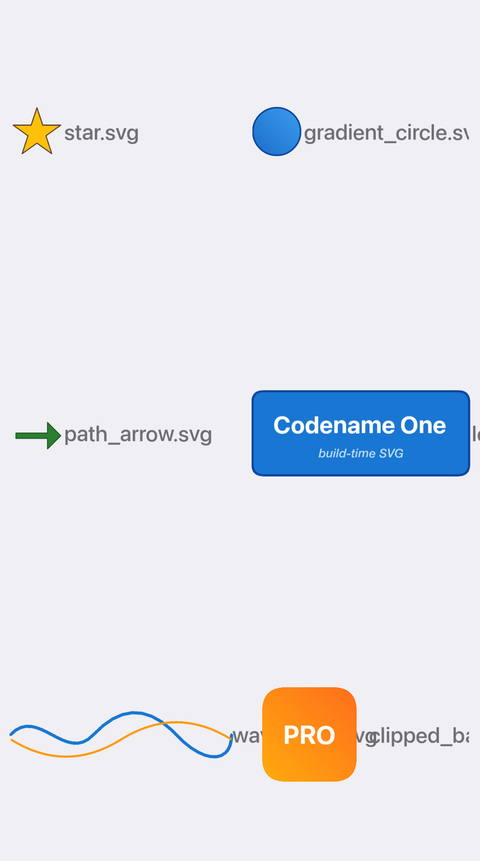
A grid of the static SVGs from the hellocodenameone fixture, rendered through the new pipeline:
Sizing in millimeters
The SVG transcoder’s most useful feature is also the one most easily missed: size every SVG in millimeters from CSS. SVGs in the wild routinely declare odd width / height attributes (a 1024×1024 export of a 24×24 icon, no dimensions at all, design-pixel values from one specific framework). Pinning the rendered size in millimeters sidesteps all of that.
HomeIcon {
    background: url(home.svg);
    cn1-svg-width:  6mm;
    cn1-svg-height: 6mm;
    bg-type:        image_scaled_fit;
}

LogoBanner {
    background: url(logo.svg);
    cn1-svg-width:  32mm;
    cn1-svg-height: 12mm;
}
A 6 mm icon is 6 mm tall on a 1× desktop, 6 mm on a high-DPI handset, and 6 mm on a 4K tablet. The transcoder routes both values through Display.convertToPixels() at install time, the same way font-size: 3mm already behaves elsewhere in Codename One CSS. No design-pixel guesswork, no DPI bucket to choose, no scaling surprise when the artist re-exports the source SVG at a different resolution.
If a project does not use CSS for theming, the two-float constructor on the generated class takes millimeters directly: new com.codename1.generated.svg.Home(6f, 6f).
Coverage and what we still want feedback on
The transcoder is a maven/svg-transcoder/ module that parses SVG with javax.xml StAX. No Batik, no Flamingo, no external dependencies. Coverage targets what real-world icon SVGs use: rect (rounded corners included), circle, ellipse, line, polyline, polygon, the full path grammar (M / L / H / V / C / S / Q / T / A / Z plus relative-coordinate and smooth-curve reflection), groups with affine transforms (translate, scale, rotate, skew, matrix), linear gradients via LinearGradientPaint, fill, stroke, stroke-width, linecap, linejoin, opacity.
SMIL animations are supported in the same pipeline: <animate>, <animateTransform> (translate, scale, rotate), and <set>. Time values interpolate against wall-clock time on every paint, with from / to / values / begin / dur / repeatCount / fill="freeze" honoured.
Text and clip-path landed in the follow-up PR for the static SVG fixtures, and both are visible in the screenshot above (the “Codename One / build-time SVG” wordmark in the rounded button, the “PRO” badge text, and the clip-path-shaped rounded-corner badge underneath). <text> and <tspan> work with single-style fills and transforms; <clipPath> referenced via clip-path="url(#id)" works against rect, circle, and path clip shapes (nested clip refs are ignored).
What is still not supported: SVG filter primitives, <mask> (treated as a clip, so alpha masking falls back to opaque), <radialGradient> (falls back to the first-stop colour), and CSS-in-SVG (style rules inside the SVG document; the transcoder reads presentation attributes and the inline style="..." attribute, but a <style> element with selectors is not parsed).
If you hit an SVG that does not transcode the way you expect, please open an issue at github.com/codenameone/CodenameOne/issues and attach the source file. The fastest way to extend the coverage is for us to run the failing case through the test fixtures and watch the output. Every SVG we ship test goldens for started as somebody else’s “this doesn’t render right” report.
Caveat on iOS: the transcoded SVGs use the framework’s shape API (fillShape, drawShape, LinearGradientPaint). The full surface is implemented on the Metal renderer. The deprecated GL ES 2 pipeline does not have parity on every operation, so an SVG drawn under ios.metal=false will often render with visible artifacts (missing gradients, clipped fills, distorted paths) rather than the placeholder you might expect. Now that Metal is the default for new iOS builds as of last Friday, this is a non-issue on most apps; if you have explicitly pinned ios.metal=false, expect some visual regressions on SVG content and let us know which.
The coverage matrix and troubleshooting are at SVG Transcoder in the developer guide.
Lottie at build time
The same pipeline carries Lottie. Drop a Bodymovin export into the same src/main/css/:
src/main/css/
    theme.css
    pulse.json
    spinner.json
After the next build, both are real Image instances on every platform that exposes the shape API. The same vector-everywhere story as SVG: a Lottie animation renders crisply at any size and slots into any Image slot in the framework.
Image pulse   = Resources.getGlobalResources().getImage("pulse");
Image spinner = Resources.getGlobalResources().getImage("spinner");
form.add(pulse).add(spinner);
Animation runs against wall-clock time on every paint, with no Timer and no allocation in the hot path. A capture of the hellocodenameone Lottie fixture in motion:
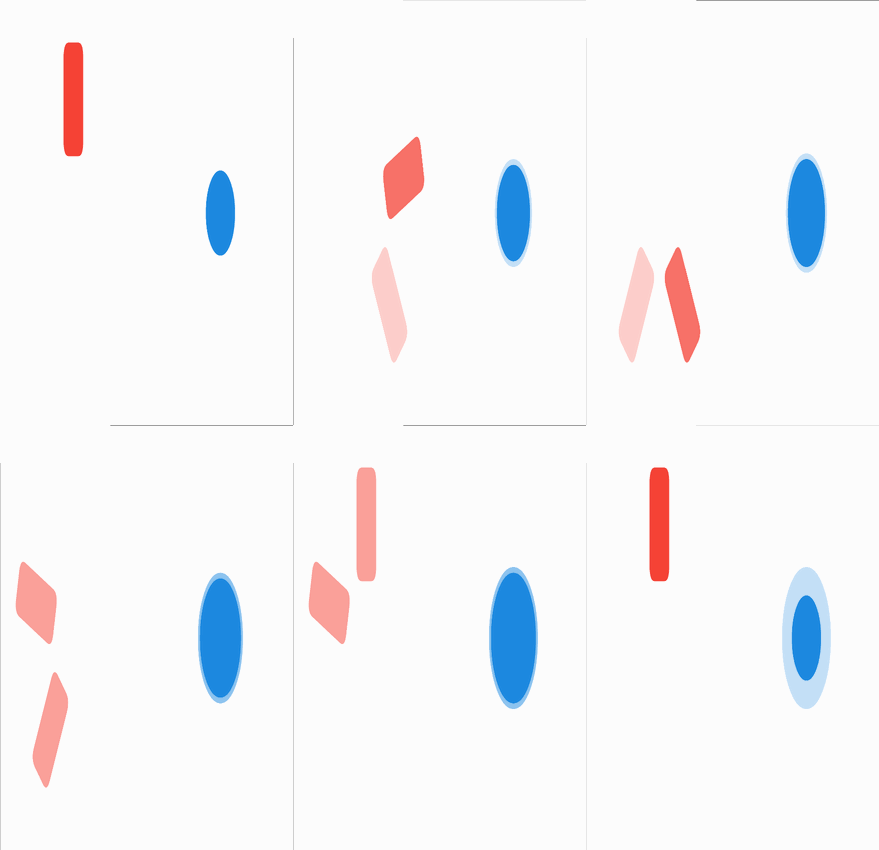
The Lottie transcoder lives in maven/lottie-transcoder/. It parses Bodymovin JSON with no external dependencies (the framework’s built-in JSON parser carries the load) and lowers each file into the same SVGDocument model the SVG path uses. The same JavaCodeGenerator emits the same GeneratedSVGImage subclass, and the same SVGRegistry registers it under the source filename. No new Image base class, no new registry, no per-port wiring, since the SVG path’s JavaSE reflective load and iOS / Android Stub weaving already cover the new format.
Coverage in v1: shape layers (rc / el / sh) with solid fills and strokes; layer transforms (anchor, position, scale, rotation, opacity); animated rotation, position, and scale collapsed to a two-keyframe loop; solid-color layers as filled rects. Most icon-grade Bodymovin exports lower cleanly. Complex character animations from After Effects with image references, masks, and effects do not, and the transcoder logs which layers it dropped so the source of any blank output is obvious.
Same ask as for SVG: if a Lottie / Bodymovin file does not transcode the way you expect, please open an issue at github.com/codenameone/CodenameOne/issues and attach the source .json. The transcoder grows one shape family at a time from the cases the community reports.
The same iOS caveat applies: the renderer leans on the shape API, so the deprecated GL ES 2 pipeline shows artifacts on the more elaborate Lottie animations. Use the Metal default (now on by default for new iOS builds).
Deep links and routing
Two pieces of plumbing for apps that handle URLs from outside themselves (notification taps, marketing links, share targets, Universal Links from Safari and the equivalent App Links from Chrome on Android).
Deep links
Codename One has had deep-link support for a long time through Display.setProperty("AppArg", url). The platform plumbing already writes the incoming URL into that property on cold launch, and an app-resume sets it again on warm launch; reading it back from start() works fine for a small number of patterns. Where the AppArg-only approach gets fragile is consistency. The cold and warm paths execute different lifecycle code, the value is a flat string with no parsing, and the trickiest case is the one where a user lands in the middle of the app via a link and then continues to interact: their next navigation needs to compose with the entry point, the back-stack needs to make sense as if they had arrived through the usual flow, and “fall off the edge of the app” on back is a common bug. With a hand-rolled AppArg reader it is easy to miss one of these and ship a half-working flow.
This release introduces a typed DeepLink and a single handler that fires for both cold and warm launches:
Display.getInstance().setDeepLinkHandler(link -> {
    // link is a normalised DeepLink: scheme, host, path,
    // segments, query map, fragment. Same shape cold or warm.
    if ("/users".equals(link.path()) && link.segments().size() == 2) {
        showUserDetailForm(link.segments().get(1));
        return true;
    }
    return false;
});
AppArg still works for projects that depend on it, but the new handler is what we recommend going forward. The handler runs on a consistent lifecycle path on both cold and warm starts, and the parsed DeepLink value carries the scheme, host, path segments, query map, and fragment so app code does not need to roll its own URL parser.
Routing
For projects that handle more than a handful of URL patterns, the second piece is the declarative router in com.codename1.router. We built it on the same build-time codegen pipeline as the ORM and the mappers (the router was actually the first concrete consumer of the new preprocessor) so the two surfaces compose: a deep-link handler that delegates to the router becomes a one-liner.
Each form declares its own path with a @Route annotation:
@Route("/")
public class HomeForm extends Form { /* ... */ }

@Route("/users/:id")
public class UserDetailForm extends Form {
    public UserDetailForm(RouteMatch match) {
        String userId = match.param("id");
        // build UI for user `userId`
    }
}

@Route("/about")
public class AboutForm extends Form { /* ... */ }
Router.navigate("/users/42") resolves the path, instantiates UserDetailForm, and shows it. The deep-link handler now collapses to:
Display.getInstance().setDeepLinkHandler(link -> Router.navigate(link.toString()));
Each form owns its own routing rule. Adding or moving a screen is a one-class change. The “what screens does this app have, and at what paths?” question is answered by an IDE search for @Route, not by reading every form constructor in the project.
For Spring developers, the shape is familiar by design. @Route plays the same role as Spring MVC’s @RequestMapping: a class-level declaration that announces “this controller handles URLs of this shape”. The :id parameter syntax mirrors Spring’s {id} path-variable syntax; RouteMatch.param("id") is the same kind of accessor as Spring’s @PathVariable. The mental model carries over from server-side Java with almost no friction. The same recognition is available to anyone with React Router, Vue Router, or Angular Router experience; the :param convention is the cross-framework default.
The build-time processor validates that each annotated class extends Form, that the path starts with /, that the constructor is accessible, and that there are no duplicate patterns. Any rule violation fails the build with a class name and a reason, not at runtime with a stack trace.
The rest of the router surface covers the kind of thing that has become table stakes in modern client routing:
- Route guards run before navigation completes and can cancel or redirect.
- Per-tab navigation stacks via
TabsForm, where each tab keeps its own back stack. - Location listeners so anything in the app can subscribe to “the route changed”.
Form.setPopGuard(PopGuard)intercepts hardware back, toolbar back, orRouter.pop()with a chance to ask “are you sure?”.Sheet.showForResult()returns anAsyncResource<T>that auto-cancels withnullif the user dismisses the sheet.
The API is opt-in. Apps that prefer the existing Form.show() / Form.showBack() flow keep using that; nothing changes.
For the link-publishing side, an AasaBuilder emits the iOS apple-app-site-association JSON and an AssetLinksBuilder emits the Android assetlinks.json. The full setup walk-through (entitlements, the Android intent-filter, the .well-known/ upload on your origin server) is at Routing and Deep Links in the developer guide.
The JavaScript port bridges the router into window.history so navigating the in-app router pushes a real entry into the browser’s session history. Back and forward in the browser drive the router; reloading the page lands at the deep-link URL; sharing the URL out of the address bar takes a colleague to the same in-app location.
How it works: the build-time codegen pipeline
Everything above sits on a single Maven-plugin pass.
The plugin has an AnnotationProcessor SPI and two new Mojos: cn1:generate-annotation-stubs (in generate-sources) and cn1:process-annotations (in process-classes). The orchestrator ASM-scans target/classes, dispatches to every registered processor, validates the annotated classes, and emits a typed runtime artifact next to each one plus a tiny Index class that registers everything with a public runtime registry. Adding a new processor later is a matter of dropping it into META-INF/services with no orchestrator changes.
The reason this runs against bytecode rather than against source text is that the source-regex prototype was scrapped early. The bytecode pass sees the JVM’s view of the project (extends Form is a thing the JVM actually knows, not a pattern we have to hope the user wrote a specific way), rule violations come back with class names and reasons, and the build fails fast before any generated .class lands on disk. The infrastructure shares the ASM passes that the BytecodeComplianceMojo’s existing String rewrites already use.
A small stub source is emitted under target/generated-sources/cn1-annotations/ during generate-sources so application code that references the generated registry resolves at compile time. The real .class overwrites the stub later in process-classes. Standard “compile against a stub, link against the real thing” pattern; it just works inside a single Maven build instead of needing a multi-module split.
cn1-core ships a no-op stub of each generated index (RoutesIndex, MappersIndex, BindersIndex, DaosIndex) so application code compiles even when the project has no annotated classes. The build-time processor shadows each stub with the real implementation before packaging.
The SVG and Lottie transcoders sit on a parallel pipeline (declarative graphics files in place of annotations), but they emit the same shape of code and obey the same constraints. The practical effect is that the kind of code that historically required reflection at runtime (with all the obfuscation hazards and surprise allocations that come with that) now happens once at build time and produces direct, dead-code-eliminable, rename-safe symbol references.
Wrapping up
That closes this release’s post series. We already have some pretty big features lined up for this Friday’s release post; the headline pieces are the most substantial things to land in months and worth checking back for.
Back to the weekly index.
Discussion
Join the conversation via GitHub Discussions.